Workforce management software: What features you should look for in 2026
Written by Lia Butler from Telecetera
Choosing the right workforce management software is a strategic decision for any business with mobile or field teams. The right solution should help you streamline processes, improve visibility and reduce manual work across planning, scheduling and job execution. In sectors such as facilities management, property maintenance and manufacturing, getting this decision right can lead directly to better performance and reduced costs.
Here are the key features you should look for when selecting a workforce management solution and how Connect WFM delivers value in each area.
1 Easy and intelligent scheduling
At the heart of any effective workforce management system is a scheduler that goes beyond manual rotas or spreadsheets.
A strong scheduler should allow you to assign jobs quickly, consider skills and availability, and adapt to changing priorities with minimal effort.
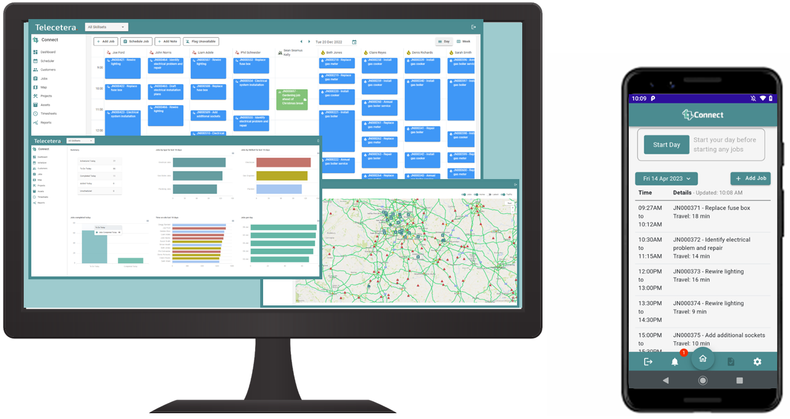
Connects Smart Scheduler does exactly that. Managers and schedulers can create jobs, assign teams and plan routes all from a clear, web-based interface.
The system updates in real time so you always have an accurate picture of upcoming work and who is available to do it. This removes the risk of double bookings or overlooked tasks and ensures you’re deploying your workforce efficiently.
2 Real-time mobile access
Field teams need reliable, up-to-date information at their fingertips. Workforce management software should support mobile operations with an app that shows job details, enables status updates and captures data on the go.
ConnectMobile, the companion app for Connect, gives mobile operatives instantaneous access to job information and lets them record time on site, add photos and update job status.
All changes sync straight back to the scheduling tool, keeping both office and field teams aligned.
3 Paperless and digital first
Many organisations still rely on paper forms, spreadsheets or manual processes for job management. These approaches increase the risk of errors, lost information and inefficiencies.
A good workforce management system eliminates these issues by digitising workflows. Connect enables businesses to go fully paperless, keeping all job details, attachments and records in one digital system. This not only reduces administration but also supports better decision-making based on accurate data.
4 Operational visibility
Knowing what is happening across your workforce at any moment is essential for managing performance and responding quickly to issues. Look for systems that provide dashboards and maps that show where teams are and how jobs are progressing.
Connect provides a live dashboard and real-time map views, giving schedulers a clear, up-to-date view of job activity, operative locations and key performance indicators. This visibility helps you plan better and respond faster when circumstances change.
5 Scalability and integration
As your business grows, your workforce management needs will evolve. A strong solution should scale with you and integrate smoothly with systems you already use.
Connect is highly configurable and designed to integrate with your existing business processes and tools. It supports multiple customers, sites and assets without adding complexity, making it ideal for organisations looking to modernise and grow.
Investing in the right workforce management software is about more than just digitising processes.
It’s about improving efficiency, enhancing communication between office and field teams, and empowering managers with the insights they need to make better decisions.
A solution like Connect WFM gives you all of this in a single, integrated platform, making it easier to manage your workforce, reduce costs and deliver consistently great results.